Warning: include() [function.include]: URL file-access is disabled in the server configuration in /home/www/ambientgrey.com/autobar.php on line 13
Warning: include(http://www.ambientgrey.com/header.html) [function.include]: failed to open stream: no suitable wrapper could be found in /home/www/ambientgrey.com/autobar.php on line 13
Warning: include() [function.include]: Failed opening 'http://www.ambientgrey.com/header.html' for inclusion (include_path='.:/usr/local/php5/lib/php') in /home/www/ambientgrey.com/autobar.php on line 13
Welcome to my progress page for my not yet named automated bar!
First look at the automated bar!
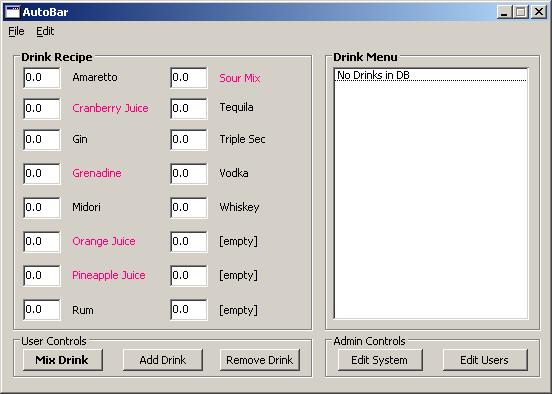
So here is a look at the main user interface for the automated bar as it currently stands. When you select a drink recipe on the right, the amounts on the left will update to the values entered for the drink. If you'd like, you can then change any amount in the list... just in case you like your drink a little stronger or weaker. When you click Mix Drink, it will take the values from the left (not the stored values for the selected drink), and mix your drink. I'm going to add in some error checking so that if there's not enough of a particular spirit left (according to it's records... you'll see when we get to the admin features), it'll let you know and will cancel the drink order (or possibly let you choose to make it anyway with what little spirits are left). When you click Mix Drink, you'll have to enter a user and password... this keeps people from accidentally pouring drinks, and allows me to add features to enable later, such as keeping a tab for drinks, etc if I'd like. The application will highlight nonalcoholic constituents, though I need to find a different color to use...
User Administration
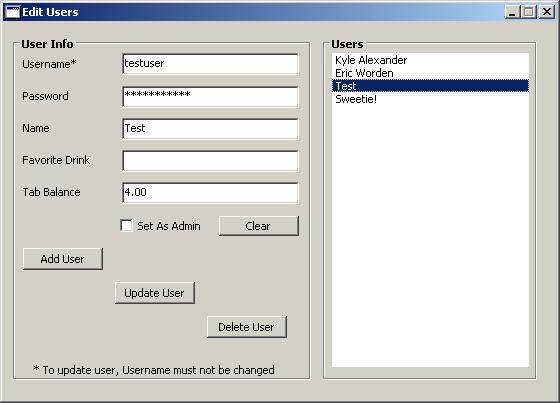
For all the administration pages, you have to be an administrator. Seems a pretty simple concept. This gets set when you create the users on the User Administration page. From here, you can create, modify or delete users. You can set their tab (this value is going to be handled as "pre-paid", not what they owe), which based off the cost of the drink, we can have the drink cost deducted from their tab (or maybe "balance" would be a better term). Hopefully this is a pretty straight-forward page.
System Administration
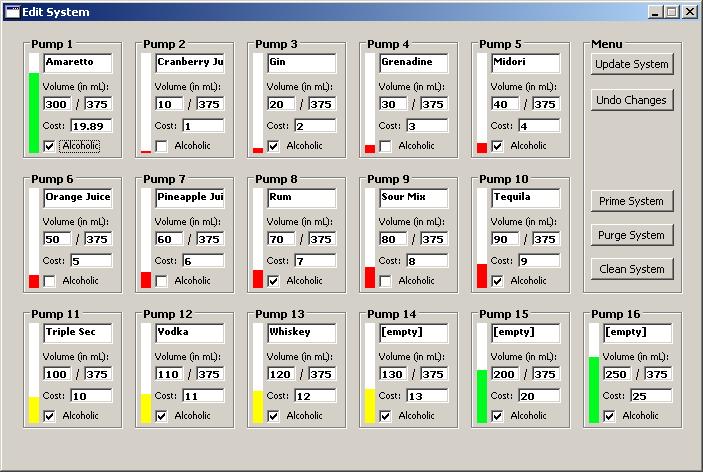
System Administration is where the fun stuff happens. Each pump is listed (there's support for 16 ingredients/pumps) with a graphical representation of how much is left. The graph is green through 50%, then yellow through 25%, and red below 25%. Here you can list the ingredients on each pump, which need to match the names for the ingredients in the drinks database, otherwise it'll tell you there's not enough of an ingredient to make the drink. You can put the volume of the bottle you're using, and the volume of the ingredient left in the bottle, the cost of the bottle, and whether it is alcoholic or not. The cost of the bottle is then divided up and used to determine how much each drink costs to make (which can then be charged to each user's tab). Here I've also placed buttons for priming the system, as well as cleaning and purging the lines. I'll program these once I know more about the pumping system.